Apollo Router 쿠키적용
쿠키기반 인증
서버 인증처리 방법중 Apollo Router를 통해서 Federation 서비스를 하게 된다면 subgraph서버에서 기본적으로 쿠키설정이 차단되어 apollo router의 설정파일router.yaml 에서도 쿠키설정을 할 수 없지만, Rhai스트립트을 이용한 기능 추가가 가능하다
보안적인 부분과 Rhai 스크립트를 통한 확장성 있는 비즈니스 로직을 구현할수 있습니다. 쿠키를 기반으로 테스트하지만, 다양한 예제를 통해서 원하는 기능을 테스트하고 쉽게 추가할 수 있습니다.
문서에서 친절히 설명되어 있지만, 적용하는데는 다소 어려움이 있습니다.
Rhai 스크립트를 활용한 쿠키 설정 테스트
Rhai스크립트는 Apollo router에서 동작하는 라이프사이클 생명 주기내에 원하는 비즈니스 작업을 스크립트로 개발할수 있습니다.
예를들면, 요청상태, 쿠키설정, 요청/응답본문내용, 로그설정 등등 필요한 기능을 제어할수 있습니다.
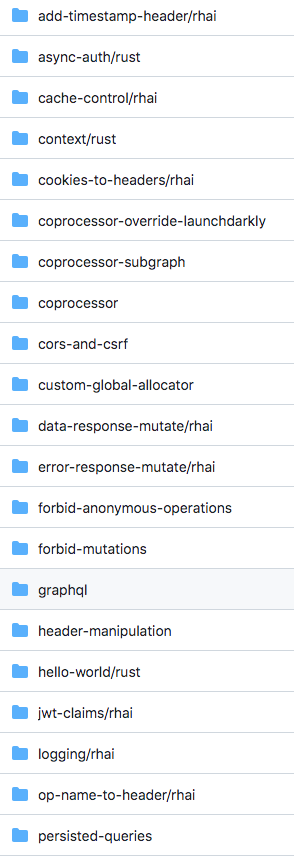
예제로 https://github.com/apollographql/router/tree/dev/examples (opens in a new tab) 해당 사이트에서 확인 가능합니다.
예제를 통해서 디버깅하고 router와 Rhai스크립트를 통해서 어떠한 정보를 얻을수있는지 테스트가 필요합니다.
Kubernetes나 서비스 배포하기전에 로컬에서 Router가 제대로 동작하는지 테스트하는것이 좋습니다.
어떻게 테스트를 해야할까요?
아래와 같이 소스를 받고 테스트를 진행합니다.
# 테스트를 위해서 router를 소스받습니다.
git clone git@github.com:apollographql/router.git

# 예제로 쿠키테스트하는페이지로 이동합니다.
cd router/examples/cookies-to-headers/rhai
example cookies-to-headers/rhai 프로젝트 구성
Rust프로젝트인만큼, 우선 위의 설정대로 cargo(rust build systme)를 설치해주세요.
# Apollo router는 rust언어로 만든 오픈소스로 cargo 패키지로 위의 내용 실행합니다.
# cargo가 없다면 설치해주세요,
curl --proto '=https' --tlsv1.2 -sSf https://sh.rustup.rs | sh
├── Cargo.toml
├── README.md
├── router.yaml
└── src
├── cookies_to_headers.rhai
└── main.rsrouter 빌드와 cookies_to_headers.rhai 실행 테스트
# README를 참고하여 아래와 같이 실행하면 빌드를 거쳐서 router가 동작됩니다.
# hover를 통해서 gernerate된 graphql 파일 : ../../graphql/supergraph.graphql
# router.yaml위에서 정의한 router설정 파일
cargo run -- -s ../../graphql/supergraph.graphql -c ./router.yaml

# 아래와 같이 노출됩니다.
2024-04-11T02:58:57.709482Z INFO  Apollo Router v1.39.0 // (c) Apollo Graph, Inc. // Licensed as ELv2 (https://go.apollo.dev/elv2)
2024-04-11T02:58:57.709560Z INFO  Anonymous usage data is gathered to inform Apollo product development.  See https://go.apollo.dev/o/privacy for details.
2024-04-11T02:58:58.146075Z WARN  telemetry.instrumentation.spans.mode is currently set to 'deprecated', either explicitly or via defaulting. Set telemetry.instrumentation.spans.mode explicitly in your router.yaml to 'spec_compliant' for log and span attributes that follow OpenTelemetry semantic conventions. This option will be defaulted to 'spec_compliant' in a future release and eventually removed altogether
2024-04-11T02:58:58.423270Z INFO  Health check exposed at http://127.0.0.1:8088/health
2024-04-11T02:58:58.425676Z INFO  GraphQL endpoint exposed at http://0.0.0.0:4000/graphql 🚀

# 서비스를 동작하면 디버그된 내용을 확인할수 있습니다.
위의 router.yaml파일은 아래 설정이 끝입다. 커스텀으로 아래의 values.yaml에서 router configuration만 가져옵니다.
# 기본 설정
rhai:
  scripts: src
  main: cookies_to_headers.rhai
위의 설정은 기본설정입니다. 추가로 router.yaml 기능 추가
# 추가 설정된 부분
sandbox:
  enabled: true
homepage:
  enabled: false
supergraph:
  listen: 0.0.0.0:4000
  introspection: true
  path: /graphql
include_subgraph_errors:
  all: true
traffic_shaping:
#      router: # Rules applied to requests from clients to the router
#        global_rate_limit: # Accept a maximum of 10 requests per 5 secs. Excess requests must be rejected.
#          capacity: 10
#          interval: 5s # Must not be greater than 18_446_744_073_709_551_615 milliseconds and not less than 0 milliseconds
#        timeout: 30s # If a request to the router takes more than 50secs then cancel the request (30 sec by default)
  all:
    timeout: 30s
    deduplicate_query: true # Enable query deduplication for all subgraphs.
plugins:
  experimental.expose_query_plan: true
headers:
  all:
    request:
      - propagate:
          matching: .* # 보안상 좋지 않지만 테스트용으로 합니다. 모든 header propagate 적용
cors:
  allow_any_origin: false
  allow_credentials: true # 보안 설정
  allow_headers: [ ]
  origins: # 요청 클라이언트 주소
    - http://localhost
    - http://localhost:3000
  methods:
    - GET
    - POST
    - OPTIONS
    - PUT
    - DELETE
health_check:
  listen: 0.0.0.0:8088
  enabled: true
rust코드 부분 supergraph 서비스에 전달할 응답값과 subgraph에서 전달받은 쿠키 설정부분에 대한 코드이다.
file: cookies_to_headers.rhai
# subgraph서버로부터 전달받은 쿠키설정을 전달합니다.
let propagated_response_headers = ["set-cookie"];
fn supergraph_service(service) {
    let response_callback = |response| {
        print("Router Response Context: "+response.context);
        for header in propagated_response_headers {
            if header in response.context {
                response.headers[header] = response.context[header];
            }
        }
    };
    service.map_response(response_callback);
}
fn subgraph_service(service, subgraph) {
    let response_callback = |response| {
        print("Subgraph response headers:"+response.headers);
        for header in propagated_response_headers {
            if header in response.headers {
                print("Subgraph response header "+header+":"+response.headers.values(header));
                let newValues = response.headers.values(header);
                let existingValues = [];
                if header in response.context {
                    if type_of(response.context[header]) == "array" {
                        existingValues = response.context[header];
                    } else {
                        existingValues = [response.context[header]];
                    }
                }
                response.context[header] = existingValues + newValues;
            }
        }
    };
    service.map_response(response_callback);
}
Apollo Router요청 라이프사이클 이해
서버 요청시 Router서비스를 거쳐서 Supergraph -> Execution Service 쿼리 실행계획 -> SubGraph(MSA Graphql서비스)를 통해서 각 서비스 요청쿼리를 전달후 응답값을 순차적으로 전달해주는 라이프 사이클입니다.
supergraph_service, subgraph_service 두개의 서비스를 통해서 subgraph에서 설정한 쿠키값을 supergraph에게 전달하는 코드를 통해서 이해할수 있습니다.
기타 rhai스크립트를 활용하여 비즈니스 코드를 추가하여 확장된 기능을 추가할수 있습니다. ex) tracing, logging, 등등
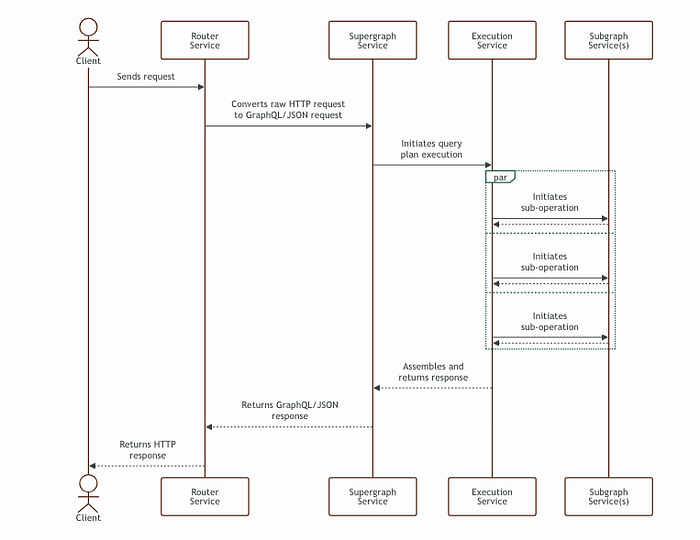
Router 라이프사이클 이미지 from apollo router site
Kubernetes 서비스 배포
테스트를 마쳤으면 Kubernetes서버에 설정된 rhai스트립트를 배포해서 실행해야합니다. 어떻게 해야할까요?
간단한 방법은 apollo router helm에서 제공해주는 volume설정을 이용하여 configmap을 연동해주는 방법으로 해주면 쉽게 연동 가능합니다.
rhai스트립트를 configmap으로 배포하겠습니다.
# rhai스크립트 파일을 configmap으로 설치한다. 키값은 cookies_to_headers.rhai
kubectl apply -f config.yaml
# config.yaml 키값은 cookies_to_headers.rhai
apiVersion: v1
kind: ConfigMap
metadata:
name: rhai-config
# 필요한 네임서비스 지정
namespace: app
data:
cookies_to_headers.rhai: |
let propagated_response_headers = ["set-cookie", "x-correlation-id"];
fn supergraph_service(service) {
let response_callback = |response| {
print("Router Response Context: "+response.context);
for header in propagated_response_headers {
if header in response.context {
response.headers[header] = response.context[header];
}
}
};
service.map_response(response_callback);
}
fn subgraph_service(service, subgraph) {
let response_callback = |response| {
print("Subgraph response headers:"+response.headers);
for header in propagated_response_headers {
if header in response.headers {
print("Subgraph response header "+header+":"+response.headers.values(header));
let newValues = response.headers.values(header);
let existingValues = [];
if header in response.context {
if type_of(response.context[header]) == "array" {
existingValues = response.context[header];
} else {
existingValues = [response.context[header]];
}
}
response.context[header] = existingValues + newValues;
}
}
};
service.map_response(response_callback);
}helm을 통해서 서비스 배포 진행
Kubernetes환경에서 Helm으로 설치한다는 가정하에 values.yaml설정 공유합니다.
아래 공식 helm소스를 받아서 배포하셔도 됩니다.
https://github.com/apollographql/router/tree/dev/helm/chart/router (opens in a new tab)
# helm values.yaml을 가져오기 위한 방법
helm show values oci://ghcr.io/apollographql/helm-charts/router > values.yaml
supergraph설정과 기타 쿠키설정과 values.yaml입니다.
# Default values for router.
# This is a YAML-formatted file.
# Declare variables to be passed into your templates.
replicaCount: 1
metadata:
  name: 'router'
  version: 1.39.0
  env:
    mode: 'dev'
  cluster: 'user_cluster'
# -- See https://www.apollographql.com/docs/router/configuration/overview/#yaml-config-file for yaml structure
router:
  labels:
    app.kubernetes.io/managed-by: Helm
    app: router
    version: 1.39.0
  selectorLabels:
    app: router
    version: 1.39.0
  configuration:
    rhai:
      main: "/dist/rhai/cookies_to_headers.rhai"
    sandbox:
      enabled: true
    homepage:
      enabled: false
    supergraph:
      listen: 0.0.0.0:4000
      introspection: true
      path: /graphql
    include_subgraph_errors:
      all: true
    traffic_shaping:
#      router: # Rules applied to requests from clients to the router
#        global_rate_limit: # Accept a maximum of 10 requests per 5 secs. Excess requests must be rejected.
#          capacity: 10
#          interval: 5s # Must not be greater than 18_446_744_073_709_551_615 milliseconds and not less than 0 milliseconds
#        timeout: 30s # If a request to the router takes more than 50secs then cancel the request (30 sec by default)
      all:
        timeout: 30s
        deduplicate_query: true # Enable query deduplication for all subgraphs.
    plugins:
      experimental.expose_query_plan: true
    headers:
      all:
        request:
          - propagate:
              matching: .* # 보안상 좋지 않지만 테스트용으로 합니다. 모든 header propagate 적용
    cors:
      allow_any_origin: false
      allow_credentials: true # 보안 설정
      allow_headers: [ ]
      origins: # 요청 클라이언트 주소
        - http://localhost
        - http://localhost:3000
      methods:
        - GET
        - POST
        - OPTIONS
        - PUT
        - DELETE
    health_check:
      listen: 0.0.0.0:8088
      enabled: true
  args:
    - --hot-reload # 자동 reload
managedFederation:
  # -- If using managed federation, the graph API key to identify router to Studio
  apiKey:
  # -- If using managed federation, use existing Secret which stores the graph API key instead of creating a new one.
  # If set along `managedFederation.apiKey`, a secret with the graph API key will be created using this parameter as name
  existingSecret:
  # -- If using managed federation, the variant of which graph to use
  graphRef: ""
# This should not be specified in values.yaml. It's much simpler to use --set-file from helm command line.
# e.g.: helm ... --set-file supergraphFile="location of your supergraph file"
supergraphFile:
extraEnvVars:
  - name: APOLLO_ROUTER_SUPERGRAPH_PATH
    value: /data/supergraph-schema.graphql
extraVolumeMounts: # 볼륨설정
  - name: supergraph-schema # supergraph 파일 볼륨
    mountPath: /data # 설치 폴더
    readOnly: true
  - name: rhai-volume # rhia 볼륨 설정
    mountPath: /dist/rhai # 설치 폴더
    readOnly: true
extraVolumes:
  - name: supergraph-schema
    configMap:
      name: "router-supergraph" # hover cli를 통해 생성된 파일 supergraph 파일
      items:
        - key: supergraph-schema.graphql
          path: supergraph-schema.graphql
  - name: rhai-volume # rhai 스크립트 파일 - 쿠키설정
    configMap:
      name: "rhai-config"
      items:
        - key: cookies_to_headers.rhai
          path: cookies_to_headers.rhai
extraEnvVarsCM: ""
extraEnvVarsSecret: ""
image:
  repository: ghcr.io/apollographql/router
  pullPolicy: IfNotPresent
  # Overrides the image tag whose default is the chart appVersion.
  tag: ""
containerPorts:
  # -- If you override the port in `router.configuration.server.listen` then make sure to match the listen port here
  http: 4000
  # -- For exposing the metrics port when running a serviceMonitor for example
  metrics: 9090
  # -- For exposing the health check endpoint
  health: 8088
Curl을 이용하여 제대로 쿠키설정 응답으로 오는지 테스트
curl -i -X POST \
  -H "Content-Type: application/json" \
  -H "Service: MODIFACTORY" \
  -H "Origin: https://exmaple.com" \
  --data '{"query": "mutation SignIn($input: SignInInput!) { signIn(input: $input) { id uuid email signUpType privacyPolicyConsent termsOfServiceConsent personalInfoConsent emailMarketingConsent smsMarketingConsent countryCode roleType }}" , "variables": { "input": { "email": "walter", "password": "password" } } }' \
  https://exmaple.com/graphql

HTTP/2 200
set-cookie: access_token=eyJhbrGcirOiJIUzI1NiIsrInR5cCI6IkpXVCJ9.eyJjb3V4udHJ5Q29kZSI6IiIsImVtYWlsIjoid2FsdGVyLmp1bmdAbHV4cm9iby5jb20iLCJleHAiOjE3MTI3OTk3NjksImlzcyI6Imlzc3VlciIsIm5iZiI6MTcxMjc5NjE2OSwicHJvZmlsZU5pY2tuYW1lIjoiIiwicHJvZmlsZVRodW1ibmFpbFVybCI6IiIsInRpbWV6b25lTmFtZSI6IiIsInVzZXIiOnsiZ3JhbnRUeXBlIjoiVVNFUiIsInZhbHVlIjowfSwidXNlcklkIjoxMn0.ro-6XHn-XehLY4ZKCp07i3Z1EFUdtyNMtDHjcv9ryTY; Path=/; Expires=Thu, 11 Apr 2024 01:42:49 GMT; HttpOnly; Secure; SameSite=None
set-cookie: refresh_token=eyJhbGrciOiJIUzI1NiIrsInR5cCI6IkpXVCJ9.eyJjb3VuerdHJ5Q29kZSI6IiIsImVtYWlsIjoid2FsdGVyLmp1bmdAbHV4cm9iby5jb20iLCJleHAiOjE3MTUzODgxNjksImlzcyI6Imlzc3VlciIsIm5iZiI6MTcxMjc5NjE2OSwicHJvZmlsZU5pY2tuYW1lIjoiIiwicHJvZmlsZVRodW1ibmFpbFVybCI6IiIsInRpbWV6b25lTmFtZSI6IiIsInVzZXIiOnsiZ3JhbnRUeXBlIjoiVVNFUiIsInZhbHVlIjowfSwidXNlcklkIjoxMn0.vfW_VWQvAkLNkmhkiX3-ryAhtgPcc9NjyuXFfwL6mg0; Path=/; Expires=Thu, 11 Apr 2024 01:42:49 GMT; HttpOnly; Secure; SameSite=None
content-type: application/json
vary: origin
content-length: 312

# cors설정 제대로 동작
access-control-allow-origin: https://example.com
access-control-allow-credentials: true
date: Thu, 11 Apr 2024 00:42:49 GMT
x-envoy-upstream-service-time: 160
server: istio-envoy

{"data":{"signIn":{"id":"12","uuid":"f7986b2d-a013-44ae-9447-903cfcdc2843","email":"xxx","signUpType":"EMAIL","privacyPolicyConsent":true,"termsOfServiceConsent":true,"personalInfoConsent":false,"emailMarketingConsent":false,"smsMarketingConsent":false,"countryCode":null,"roleType":"USER"}}}
마지막으로 graphql에서 sandbox로 사용하는 apollo studio playground에서 쿠키 설정이 동작되는지 확인을 해보면 응답으로는 오지만 apollo studio playground sandbox에는 쿠키가 저장되지 않는 이슈가 있습니다.
상단의 도메인의 옵션을 클릭을 통해서 쿠키설정 할 수 있습니다.
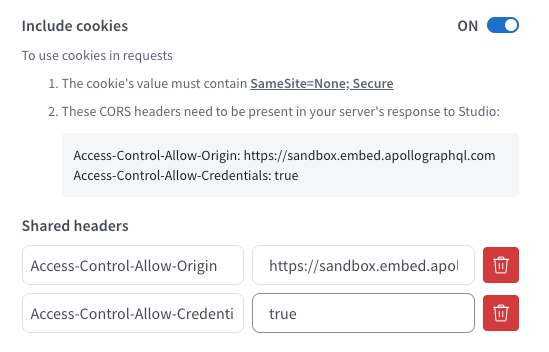
sandbox 쿠키적용을 위해서 응답 Header설정을 추가합니다.
웹브라우저 개발자 모드에 들어가서 어플리케이션 탭에 관련 쿠키 도메인을 확인해보면 원하는 쿠키가 설정이 제대로 되어있는지 확인 가능합니다.
결론
Apollo router를 활용한 rust코드를 빌드하고 테스트하면서 내부적으로 어떤방법으로 각각의 subGraph와의 라이프사이클이 동작하는지 이해할수 있는 시간이었다. 그에 따른 문서와 설정을 테스트하면서 이전보다 Apollo router잘 활용할 수 있을듯하다.
참고 사이트
https://github.com/a-pedini/a-pedini_router/tree/main (opens in a new tab)